核心 UI 组件(中文译文)
原始 DeepWiki 页面:https://deepwiki.com/paperless-ngx/paperless-ngx/2.1-core-ui-components
翻译时间:2026-05-27T08:44:21.656Z
翻译模型:deepseek-chat
原文字符数:11631
项目:Paperless-ngx (paperless-ngx)
---
核心 UI 组件
相关源文件
以下文件被用作生成此 Wiki 页面的上下文:
src-ui/src/app/app-routing.module.tssrc-ui/src/app/app.component.htmlsrc-ui/src/app/app.component.tssrc-ui/src/app/components/app-frame/app-frame.component.htmlsrc-ui/src/app/components/app-frame/app-frame.component.scsssrc-ui/src/app/components/app-frame/app-frame.component.spec.tssrc-ui/src/app/components/app-frame/app-frame.component.tssrc-ui/src/app/components/app-frame/global-search/global-search.component.htmlsrc-ui/src/app/components/app-frame/global-search/global-search.component.spec.tssrc-ui/src/app/components/app-frame/global-search/global-search.component.tssrc-ui/src/app/components/common/toasts/toasts.component.htmlsrc-ui/src/app/components/common/toasts/toasts.component.scsssrc-ui/src/app/components/common/toasts/toasts.component.spec.tssrc-ui/src/app/components/common/toasts/toasts.component.tssrc-ui/src/app/services/open-documents.service.spec.tssrc-ui/src/app/services/open-documents.service.tssrc-ui/src/app/services/toast.service.tssrc-ui/src/styles.scsssrc-ui/src/theme.scss
引言
本文档记录了 Paperless-ngx 的核心 UI 组件,重点关注主布局结构、导航系统和主要界面元素。这些组件构成了应用程序用户界面的基础,并协调系统中不同部分的协作方式。
应用框架结构
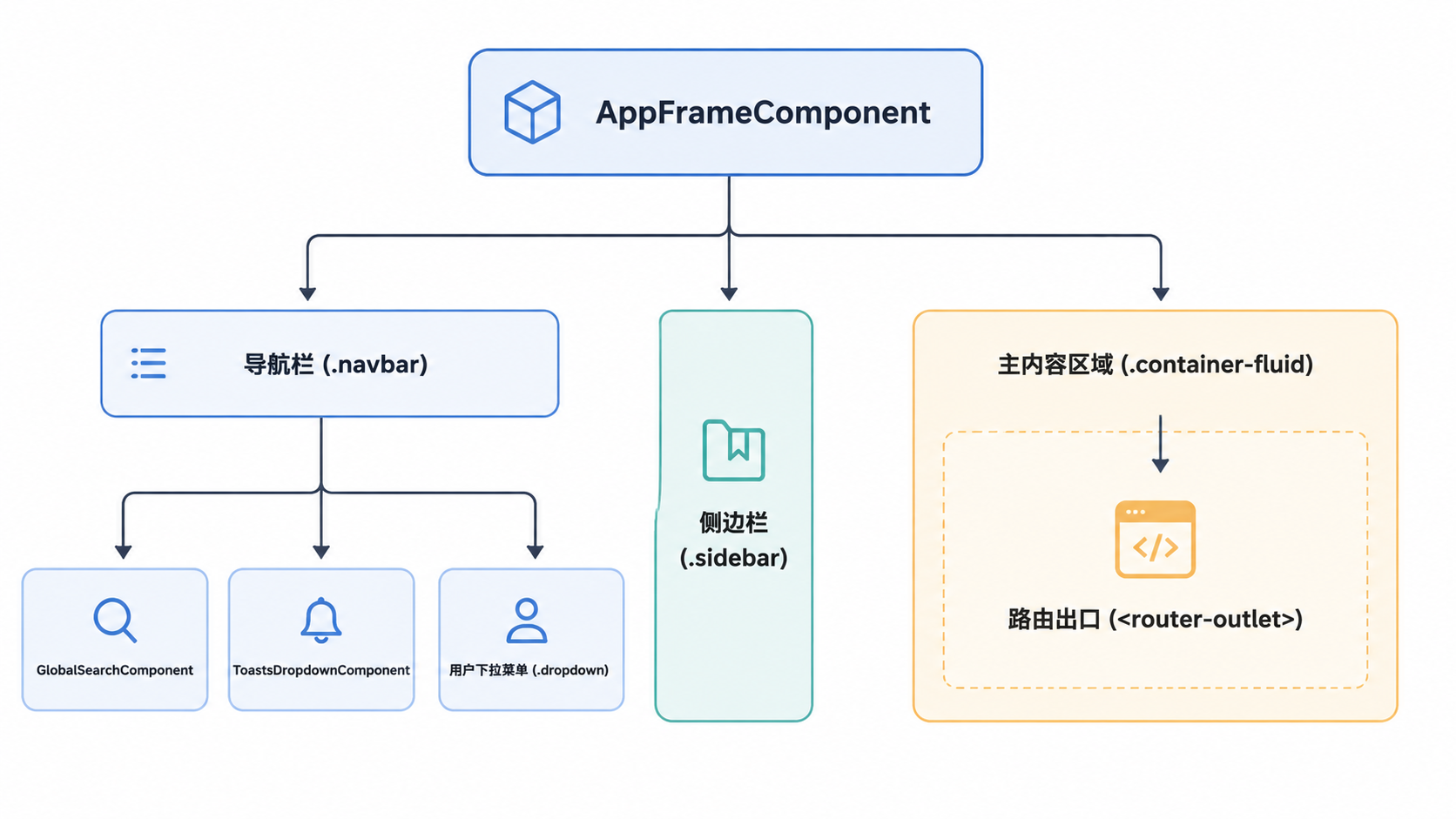
主要的 UI 容器是 AppFrameComponent,它作为整个应用程序的主布局结构。该组件渲染导航栏、侧边栏和主要内容区域,其他组件通过 Angular 路由出口加载到该区域中。
应用框架组件层级
来源:
src-ui/src/app/components/app-frame/app-frame.component.html:1-358src-ui/src/app/components/app-frame/app-frame.component.ts:77-80
顶部导航栏
顶部导航栏实现为一个固定位置的 Bootstrap 导航栏 src-ui/src/app/components/app-frame/app-frame.component.html:1,包含以下内容:
- 用于在移动设备上切换侧边栏的按钮
src-ui/src/app/components/app-frame/app-frame.component.html:2-6 - 应用程序徽标和标题,可通过
customAppTitle进行自定义src-ui/src/app/components/app-frame/app-frame.component.html:7-24 - 用于文档和对象查找的
pngx-global-search组件src-ui/src/app/components/app-frame/app-frame.component.html:28 - 用于系统通知的
pngx-toasts-dropdown组件src-ui/src/app/components/app-frame/app-frame.component.html:35 - 用户个人资料下拉菜单,提供对
editProfile()、settings和onLogout()的访问src-ui/src/app/components/app-frame/app-frame.component.html:36-64
来源:
src-ui/src/app/components/app-frame/app-frame.component.html:1-66src-ui/src/app/components/app-frame/app-frame.component.scss:270-320
侧边栏导航
侧边栏(#sidebarMenu)提供主要的导航界面,按功能区域组织,包括仪表盘、文档、已保存视图和管理 src-ui/src/app/components/app-frame/app-frame.component.html:70-264。
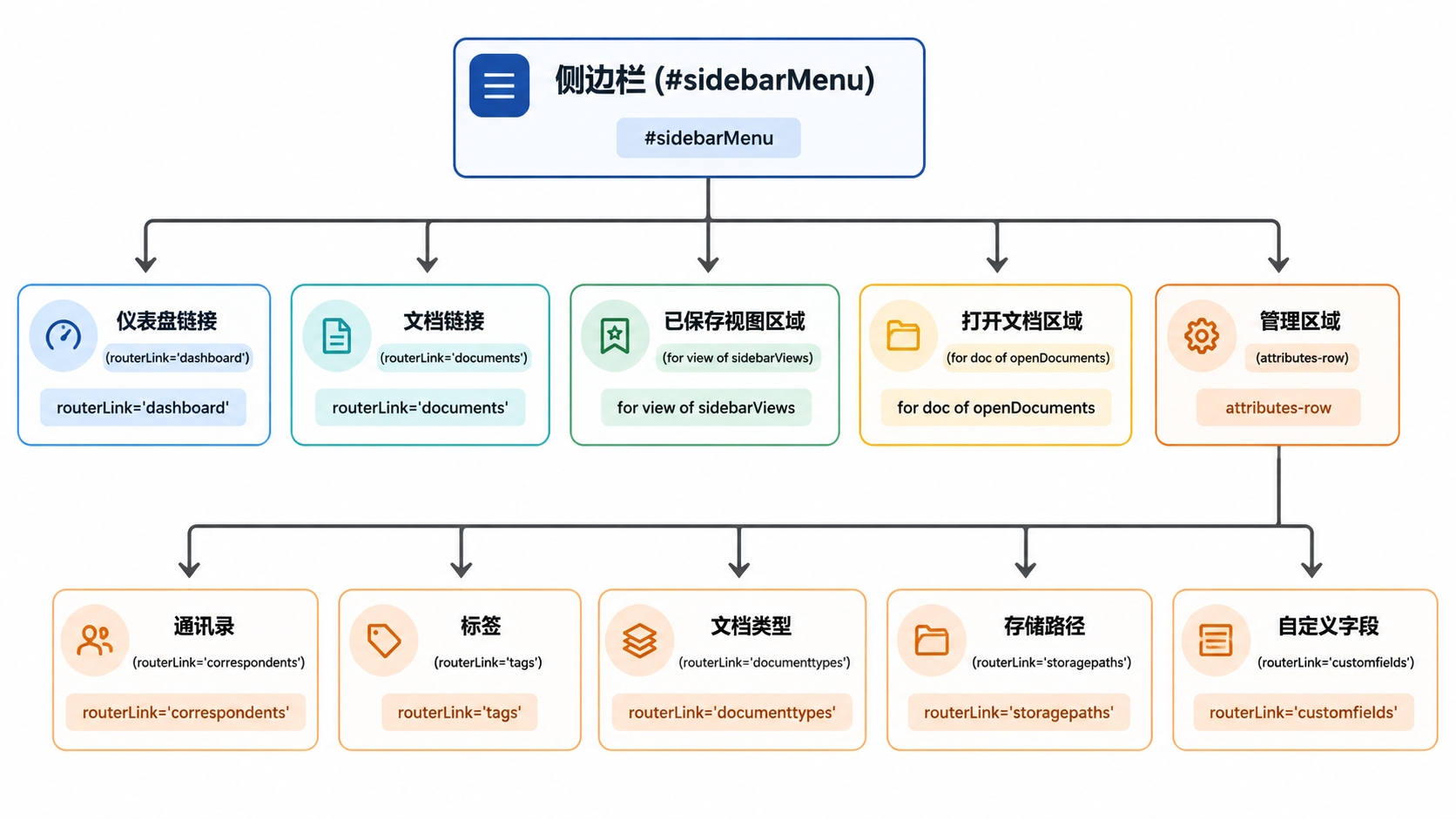
侧边栏使用 *pngxIfPermissions 指令实现了基于权限的链接可见性 src-ui/src/app/components/app-frame/app-frame.component.html:91。
来源:
src-ui/src/app/components/app-frame/app-frame.component.html:70-264src-ui/src/app/components/app-frame/app-frame.component.scss:4-42
精简侧边栏功能
UI 支持"精简"侧边栏模式,可将宽度缩减至 50px src-ui/src/app/components/app-frame/app-frame.component.scss:88。
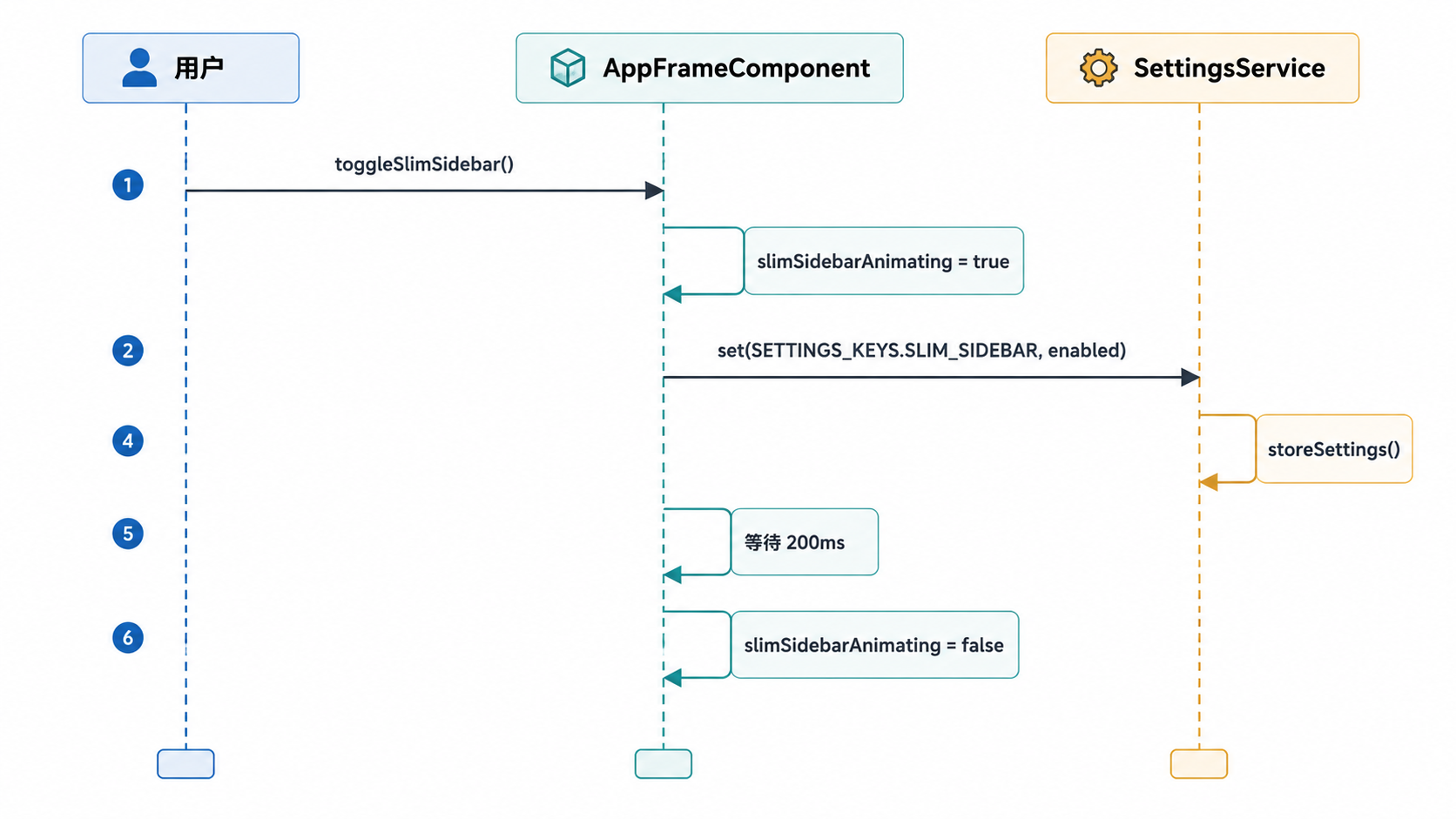
启用后,文本标签会通过 CSS 隐藏 src-ui/src/app/components/app-frame/app-frame.component.scss:101,并为导航图标启用 ngbPopover 工具提示 src-ui/src/app/components/app-frame/app-frame.component.html:86。
来源:
src-ui/src/app/components/app-frame/app-frame.component.ts:149-172src-ui/src/app/components/app-frame/app-frame.component.scss:86-157
文档管理 UI
OpenDocumentsService 负责跟踪当前正在编辑的文档。它会在 sessionStorage 中维护一个最多包含 5 个文档的列表 src-ui/src/app/services/open-documents.service.ts:17-24。
打开文档流程
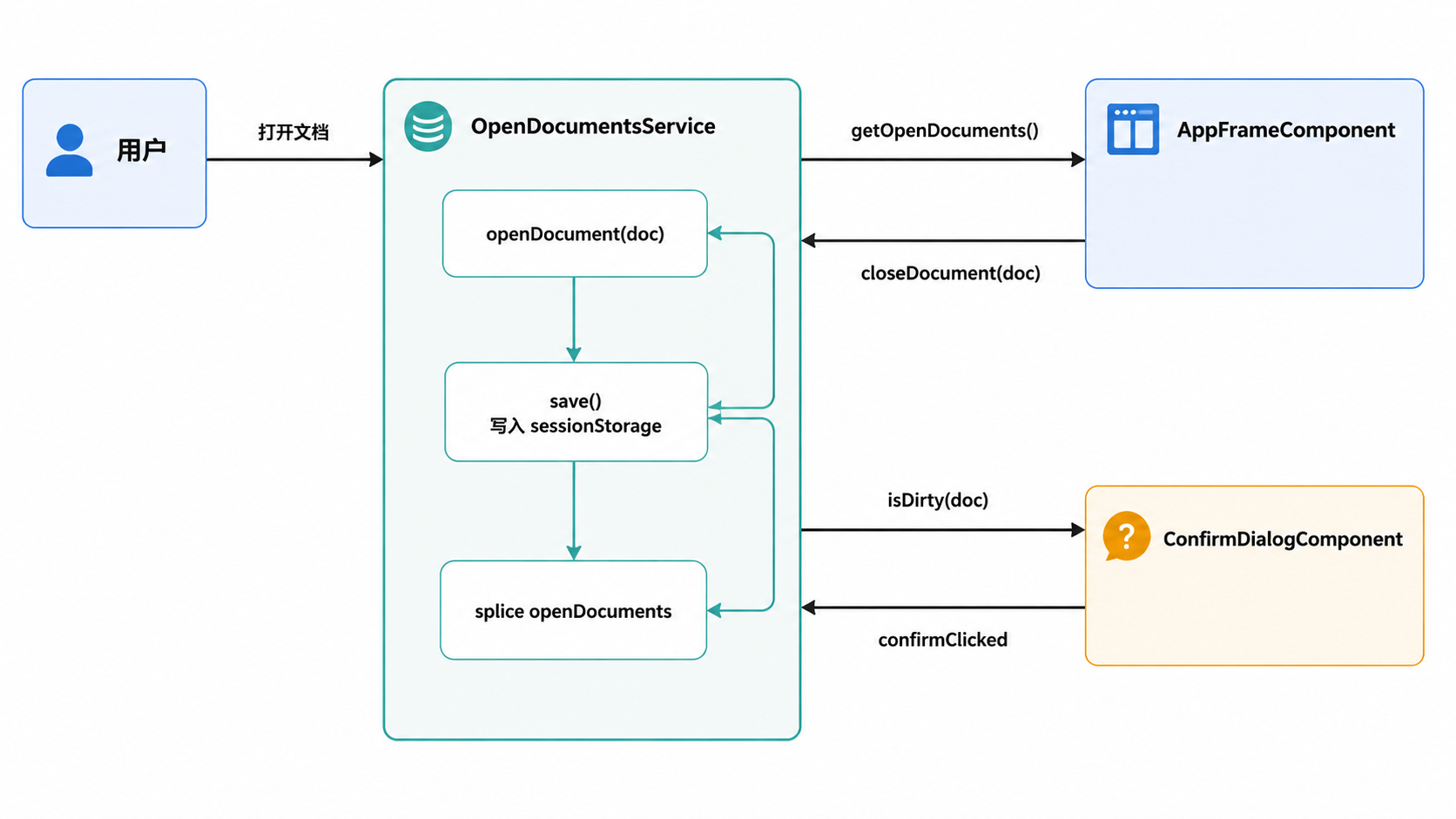
OpenDocumentsService 中的关键函数:
openDocument(doc):将文档添加到列表开头src-ui/src/app/services/open-documents.service.ts:63-79。setDirty(doc, dirty):跟踪文档是否有未保存的更改src-ui/src/app/services/open-documents.service.ts:87-101。closeDocument(doc):移除文档,如果文档有未保存更改,则通过ConfirmDialogComponent提示用户src-ui/src/app/services/open-documents.service.ts:111-142。
来源:
src-ui/src/app/services/open-documents.service.ts:13-182src-ui/src/app/components/app-frame/app-frame.component.html:128-158
全局搜索组件
GlobalSearchComponent 提供了一个统一的界面,用于搜索文档和管理对象 src-ui/src/app/components/app-frame/global-search/global-search.component.ts:72。
- 输入处理:使用
queryDebounce延迟 400ms 后再调用searchService.globalSearch()src-ui/src/app/components/app-frame/global-search/global-search.component.ts:108-118。 - 导航:搜索结果在
NgbDropdown中显示。用户可以使用方向键在结果间导航src-ui/src/app/components/app-frame/global-search/global-search.component.ts:168-217。 - 操作:
- 主要操作:导航到文档或打开编辑对话框(例如 TagEditDialogComponent)src-ui/src/app/components/app-frame/global-search/global-search.component.ts:137-189。 - 次要操作:按所选对象过滤文档列表 src-ui/src/app/components/app-frame/global-search/global-search.component.ts:191-215。
来源:
src-ui/src/app/components/app-frame/global-search/global-search.component.ts:59-215src-ui/src/app/components/app-frame/global-search/global-search.component.html:1-125
UI 主题与样式
系统使用基于 SCSS 的主题引擎,并利用 CSS 自定义属性。
| 属性 | 描述 |
|---|---|
--pngx-primary | 主品牌颜色的 HSL 值 src-ui/src/theme.scss:4。 |
--bs-primary | 从 --pngx-primary 派生,用于 Bootstrap 兼容性 src-ui/src/theme.scss:12。 |
.dark-mode | 定义深色主题覆盖的 Mixin,包括 color-scheme: dark src-ui/src/theme.scss:75-76。 |
SettingsService.updateAppearanceSettings() 方法(在 AppComponent 中调用)会将适当的主题类应用到文档 body 上 src-ui/src/app/app.component.ts:48。
来源:
src-ui/src/theme.scss:1-240src-ui/src/styles.scss:1-162
路由模块
AppRoutingModule 定义了应用程序的结构。大多数路由都是 AppFrameComponent 的子路由 src-ui/src/app/app-routing.module.ts:32-34。
- 守卫:
- 路径:
- DirtyDocGuard:如果文档有未保存的更改,则阻止导航 src-ui/src/app/app-routing.module.ts:33。 - PermissionsGuard:在激活路由前检查 requiredPermission 数据 src-ui/src/app/app-routing.module.ts:46。
- /dashboard:加载 DashboardComponent src-ui/src/app/app-routing.module.ts:36。 - /documents:加载 DocumentListComponent src-ui/src/app/app-routing.module.ts:43。 - /documents/:id:加载 DocumentDetailComponent src-ui/src/app/app-routing.module.ts:69。
来源:
src-ui/src/app/app-routing.module.ts:28-215