导入与导出(中文译文)
原始 DeepWiki 页面:https://deepwiki.com/paperless-ngx/paperless-ngx/7-import-and-export
翻译时间:2026-05-27T08:44:23.590Z
翻译模型:deepseek-chat
原文字符数:12256
项目:Paperless-ngx (paperless-ngx)
---
导入与导出
相关源文件
以下文件被用作生成此维基页面的上下文:
src/documents/management/commands/document_exporter.pysrc/documents/management/commands/document_importer.pysrc/documents/management/commands/mixins.pysrc/documents/settings.pysrc/documents/tests/test_management_exporter.pysrc/documents/tests/test_management_importer.py
本文档说明了 Paperless-ngx 用于从一个实例导出文档及其元数据,并将其导入到另一个实例的系统。该功能支持数据迁移、备份与恢复操作,以及在独立的 Paperless-ngx 实例之间传输文档集合。
概述
导入/导出系统允许您:
- 导出所有文档及其元数据(通信方、标签、文档类型等)。
- 将文档导出到目录或压缩的 zip 文件中。
- 使用可配置的命名格式来组织导出内容。
- 通过
CryptMixin使用加密保护敏感信息。 - 使用
ijson进行内存高效的清单解析,将先前导出的数据导入到新的或现有的 Paperless-ngx 实例中。
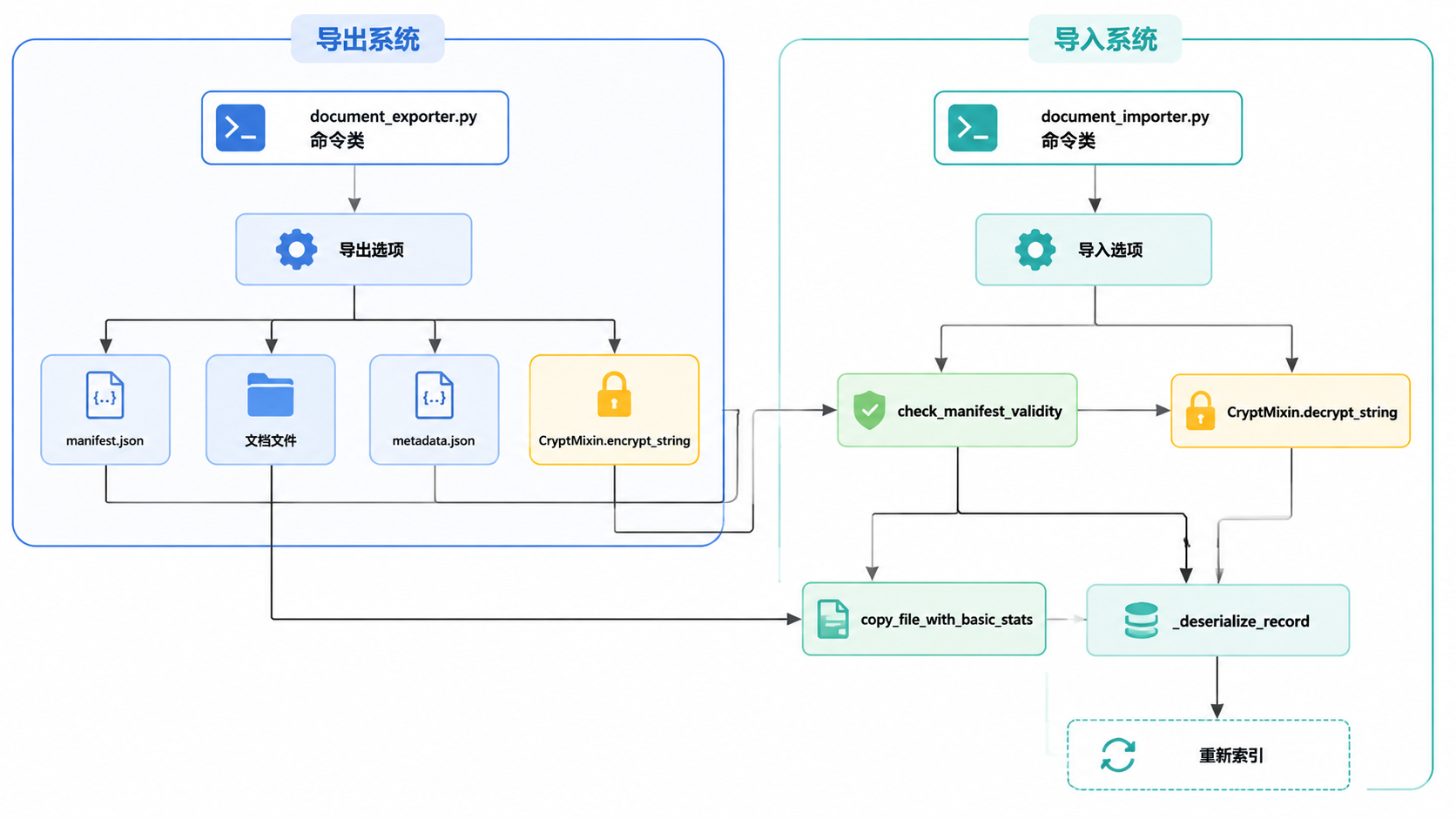
来源:src/documents/management/commands/document_exporter.py:168-177, src/documents/management/commands/document_importer.py:182-192, src/documents/management/commands/mixins.py:23-42
导出系统
导出系统实现为一个 Django 管理命令,它从数据库中提取文档及其元数据,并将其复制到指定的目标位置。
导出命令
导出器命令提供了多种选项来自定义导出过程:
python manage.py document_exporter [选项] <目标目录>| 选项 | 描述 |
|---|---|
--compare-checksums, -c | 在确定是否导出文件时比较文件校验和 src/documents/management/commands/document_exporter.py:182-192 |
--compare-json, -cj | 比较 JSON 文件校验和以确定是否需要更新清单文件 src/documents/management/commands/document_exporter.py:195-205 |
--delete, -d | 删除导出目录中不属于当前导出的文件 src/documents/management/commands/document_exporter.py:207-215 |
--use-filename-format, -f | 使用 PAPERLESS_FILENAME_FORMAT 在导出目录中存储文件 src/documents/management/commands/document_exporter.py:217-226 |
--no-archive, -na | 跳过导出归档文件 src/documents/management/commands/document_exporter.py:228-233 |
--no-thumbnail, -nt | 跳过导出缩略图文件 src/documents/management/commands/document_exporter.py:235-240 |
--use-folder-prefix, -p | 将文件导出到专用文件夹(归档、原始文件、缩略图) src/documents/management/commands/document_exporter.py:242-250 |
--split-manifest, -sm | 将文档信息导出到单独的清单 JSON 文件中 src/documents/management/commands/document_exporter.py:252-261 |
--zip, -z | 将文档导出到给定目录中的 zip 文件 src/documents/management/commands/document_exporter.py:263-268 |
--zip-name, -zn | 设置导出 zip 文件的名称 src/documents/management/commands/document_exporter.py:270-275 |
--data-only | 仅导出数据库条目,不导出文档文件 src/documents/management/commands/document_exporter.py:277-282 |
--passphrase | 使用此密码短语加密导出中的敏感数据 src/documents/management/commands/document_exporter.py:284-289 |
来源:src/documents/management/commands/document_exporter.py:178-293
导出结构
一次导出包含:
- 清单文件:包含序列化记录的
manifest.jsonsrc/documents/management/commands/document_exporter.py:87-93。 - 文档文件:原始文档、归档版本和缩略图。
- 元数据文件:包含版本信息和加密设置的
metadata.json。
StreamingManifestWriter 类用于增量写入 JSON 数组,以避免高内存消耗 src/documents/management/commands/document_exporter.py:87-115。
来源:src/documents/management/commands/document_exporter.py:117-136, src/documents/settings.py:1-12
导出过程
当导出命令运行时,它会:
- 确定目标路径,并可选地创建一个
ZipFilesrc/documents/management/commands/document_exporter.py:321-344。 - 遍历所有相关模型(文档、标签、通信方等)
src/documents/management/commands/document_exporter.py:355-393。 - 使用
serialize_queryset_batched分块获取和序列化记录src/documents/management/commands/document_exporter.py:71-84。 - 使用
copy_file_with_basic_stats复制文件src/documents/management/commands/document_exporter.py:536-548。 - 可选地加密
CryptMixin.CRYPT_FIELDS中定义的敏感字段(例如,邮件账户密码)src/documents/management/commands/mixins.py:54-71。
来源:src/documents/management/commands/document_exporter.py:314-410, src/documents/management/commands/mixins.py:128-133
导入系统
导入系统读取导出的数据并将其恢复到 Paperless-ngx 实例中。它使用 ijson 解析清单,从而能够处理非常大的导出文件,而无需将整个 JSON 加载到内存中 src/documents/management/commands/document_importer.py:62-68。
导入命令
导入器命令提供了几个选项:
python manage.py document_importer [选项] <源目录>| 选项 | 描述 |
|---|---|
--data-only | 仅导入数据库条目,不导入文档文件 src/documents/management/commands/document_importer.py:208-213 |
--passphrase | 用于解密导出中敏感字段的密码短语 src/documents/management/commands/document_importer.py:215-220 |
来源:src/documents/management/commands/document_importer.py:194-222
导入过程
导入过程遵循以下步骤:
- 预检查:验证源目录存在且可读
src/documents/management/commands/document_importer.py:294-310。 - 清单有效性:检查清单中引用的所有文件是否实际存在于导出中
src/documents/management/commands/document_importer.py:312-337。 - 数据库反序列化:
_deserialize_record函数将清单记录转换回 Django 模型实例src/documents/management/commands/document_importer.py:71-137。 - 批量创建:使用
bulk_create将记录分批刷新到数据库以提高性能src/documents/management/commands/document_importer.py:541-570。 - 信号处理:在导入期间临时禁用
post_save等信号,以防止在批量加载期间进行不必要的处理(如文件名重命名)src/documents/management/commands/document_importer.py:465-475。
来源:src/documents/management/commands/document_importer.py:225-292, src/documents/management/commands/document_importer.py:532-580
敏感字段解密
如果导出是使用加密创建的:
CryptMixin.load_crypt_params方法从清单元数据中加载加密参数src/documents/management/commands/mixins.py:87-100。setup_crypto使用提供的密码短语和存储的盐值派生密钥src/documents/management/commands/mixins.py:102-126。- 在保存到数据库之前,敏感字段通过
decrypt_string进行解密src/documents/management/commands/mixins.py:135-139。
来源:src/documents/management/commands/document_importer.py:411-441, src/documents/management/commands/mixins.py:102-139
技术实现
关键类与组件
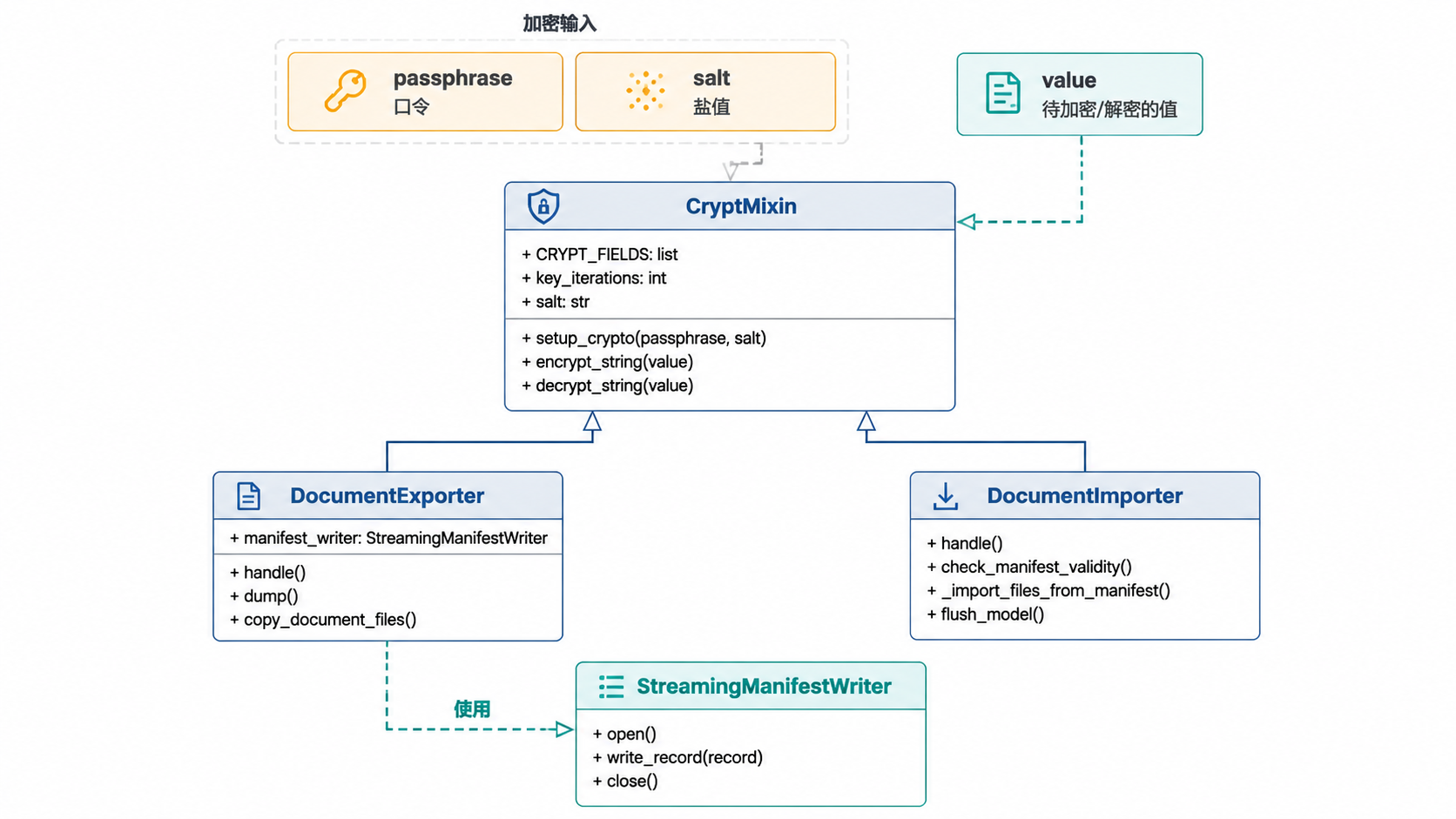
来源:src/documents/management/commands/document_exporter.py:87-168, src/documents/management/commands/document_importer.py:182-192, src/documents/management/commands/mixins.py:23-71
数据映射
_deserialize_record 函数在导入期间处理复杂的字段映射:
- 主键:强制转换为模型所需的正确 Python 类型
src/documents/management/commands/document_importer.py:100-105。 - 多对多关系:主键被收集并在通过
bulk_create创建主记录后应用src/documents/management/commands/document_importer.py:111-116。 - 外键:作为整数主键存储在
attname上(例如,correspondent_id),以避免在反序列化期间进行额外的数据库查找src/documents/management/commands/document_importer.py:118-126。
来源:src/documents/management/commands/document_importer.py:71-137
常见用例
实例间迁移
要将所有数据从一个 Paperless-ngx 实例迁移到另一个实例:
- 导出:
python manage.py document_exporter /path/to/export - 导入:
python manage.py document_importer /path/to/export
带加密的安全备份
要保护备份中的敏感邮件账户凭据:
python manage.py document_exporter --passphrase "mysecret" /path/to/export这会触发对 CRYPT_FIELDS 中定义的字段进行 CryptMixin.encrypt_string 操作 src/documents/management/commands/mixins.py:54-71。
故障排除
清单验证错误
如果导入失败并显示 CommandError: The manifest file refers to "X" but it does not exist,则 check_manifest_validity 方法发现 JSON 中引用的文件缺失 src/documents/management/commands/document_importer.py:312-337。
完整性错误
如果导入到非空数据库,可能会遇到 IntegrityError。导入器会检查现有用户和文档,以在继续之前警告用户 src/documents/management/commands/document_importer.py:235-260。
来源:src/documents/management/commands/document_importer.py:312-337, src/documents/tests/test_management_importer.py:30-104