文档数据模型(中文译文)
原始 DeepWiki 页面:https://deepwiki.com/paperless-ngx/paperless-ngx/3.2-document-data-model
翻译时间:2026-05-27T08:44:20.692Z
翻译模型:deepseek-chat
原文字符数:9440
项目:Paperless-ngx (paperless-ngx)
--- 好的,作为一名资深技术文档翻译专家,我将严格遵循您的要求,将这篇 DeepWiki 技术文档全文翻译为中文,并进行专业润色。
---
文档数据模型
相关源文件
以下文件被用作生成此 Wiki 页面的上下文:
paperless.conf.examplesrc/documents/__init__.pysrc/documents/admin.pysrc/documents/apps.pysrc/documents/checks.pysrc/documents/consumer.pysrc/documents/file_handling.pysrc/documents/matching.pysrc/documents/models.pysrc/documents/parsers.pysrc/documents/signals/handlers.pysrc/documents/templating/filepath.pysrc/documents/templating/workflows.pysrc/documents/tests/factories.pysrc/documents/tests/test_admin.pysrc/documents/tests/test_api_objects.pysrc/documents/tests/test_checks.pysrc/documents/tests/test_consumer.pysrc/documents/tests/test_document_model.pysrc/documents/tests/test_file_handling.pysrc/documents/tests/test_matchables.pysrc/documents/tests/test_models.pysrc/documents/tests/test_parsers.pysrc/documents/tests/test_task_signals.py
本文描述了 Paperless-ngx 中用于表示文档及其关联元数据的核心数据模型。内容涵盖数据库模式、实体间关系、软删除、版本控制以及与文档数据直接相关的关键功能。
文档数据模型概览
Paperless-ngx 的文档数据模型将文档元数据(存储在数据库中)与物理文档内容(存储在文件系统中)分离开来。Document 模型是核心枢纽,它连接了分类实体、富化数据和存储引用。
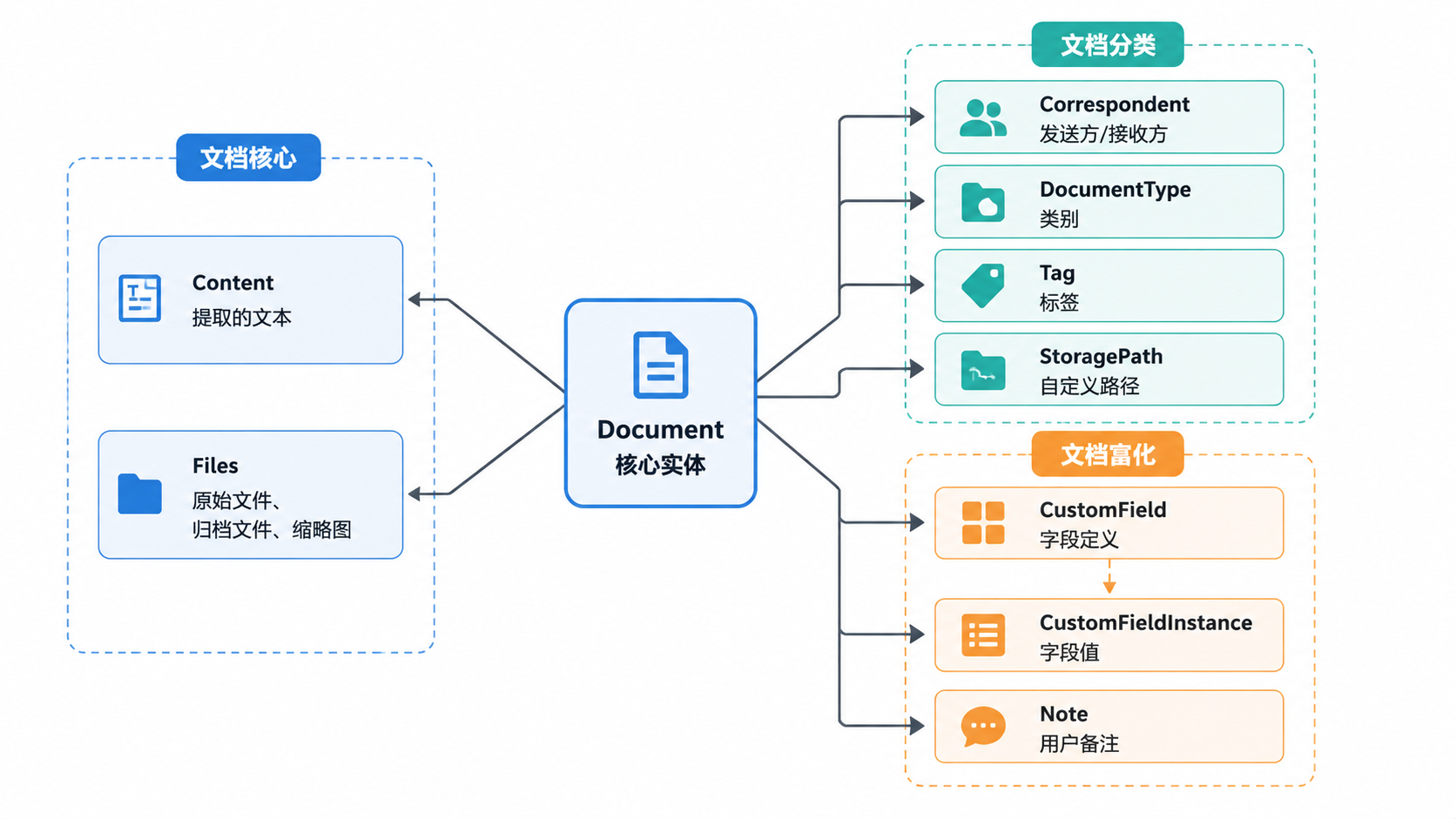
来源:src/documents/models.py:96-156, src/documents/models.py:157-376, src/documents/models.py:622-659, src/documents/models.py:722-850
核心文档模型
Document 类继承自 SoftDeleteModel 和 ModelWithOwner。它通过校验和来追踪文件状态,并同时管理原始版本和归档版本。
关键字段与属性
- ASN:
archive_serial_number是一个唯一标识符,常用于物理归档系统src/documents/models.py:240-252。 - 校验和:
checksum(原始文件)和archive_checksum(处理后的 PDF/A 文件)用于确保数据完整性和重复检测src/documents/models.py:216-230。 - 软删除:使用
SoftDeleteModel,允许文档在永久删除前先移至“回收站”状态src/documents/models.py:157,src/documents/tests/test_document_model.py:65-104。 - 内容长度:数据库生成的字段
content_length提供了文本量的快速统计src/documents/models.py:198-206。
版本控制
Paperless-ngx 通过 root_document 和 version_index 字段支持文档版本控制。
- 根文档代表当前“活跃”的版本。
- 其他版本通过外键
root_document链接回根文档src/documents/models.py:277-283。 suggestion_content属性会自动从最新版本中检索文本,用于分类目的src/documents/models.py:440-456。
来源:src/documents/models.py:157-300, src/documents/models.py:440-456, src/documents/tests/test_document_model.py:178-198
文档分类实体
分类实体继承自 MatchingModel,该模型提供了在消费管线中自动分配的逻辑。
| 模型 | 用途 | 关键特性 |
|---|---|---|
Correspondent | 表示文档的发送方/接收方。 | 匹配模式 src/documents/models.py:96。 |
Tag | 用于组织的标签。 | 层级嵌套(最大深度 5),收件箱标记 src/documents/models.py:102-140。 |
DocumentType | 对文件性质进行分类(例如,发票)。 | 匹配模式 src/documents/models.py:141。 |
StoragePath | 定义动态的文件系统路径。 | 使用 Jinja2 模板 src/documents/models.py:147, src/documents/file_handling.py:102-122。 |
匹配逻辑
MatchingModel 支持在 src/documents/models.py:47-63() 中定义的几种算法:
MATCH_ANY/MATCH_ALL:基于单词的匹配。MATCH_REGEX:正则表达式匹配。MATCH_FUZZY:基于 Levenshtein 距离的模糊匹配。MATCH_AUTO:利用DocumentClassifier(机器学习)src/documents/matching.py:47-167。
来源:src/documents/models.py:46-156, src/documents/matching.py:47-167, src/documents/file_handling.py:102-122
自定义字段
CustomField 系统允许动态扩展文档模式。它由一个定义(CustomField)和一个文档特定的值(CustomFieldInstance)组成。
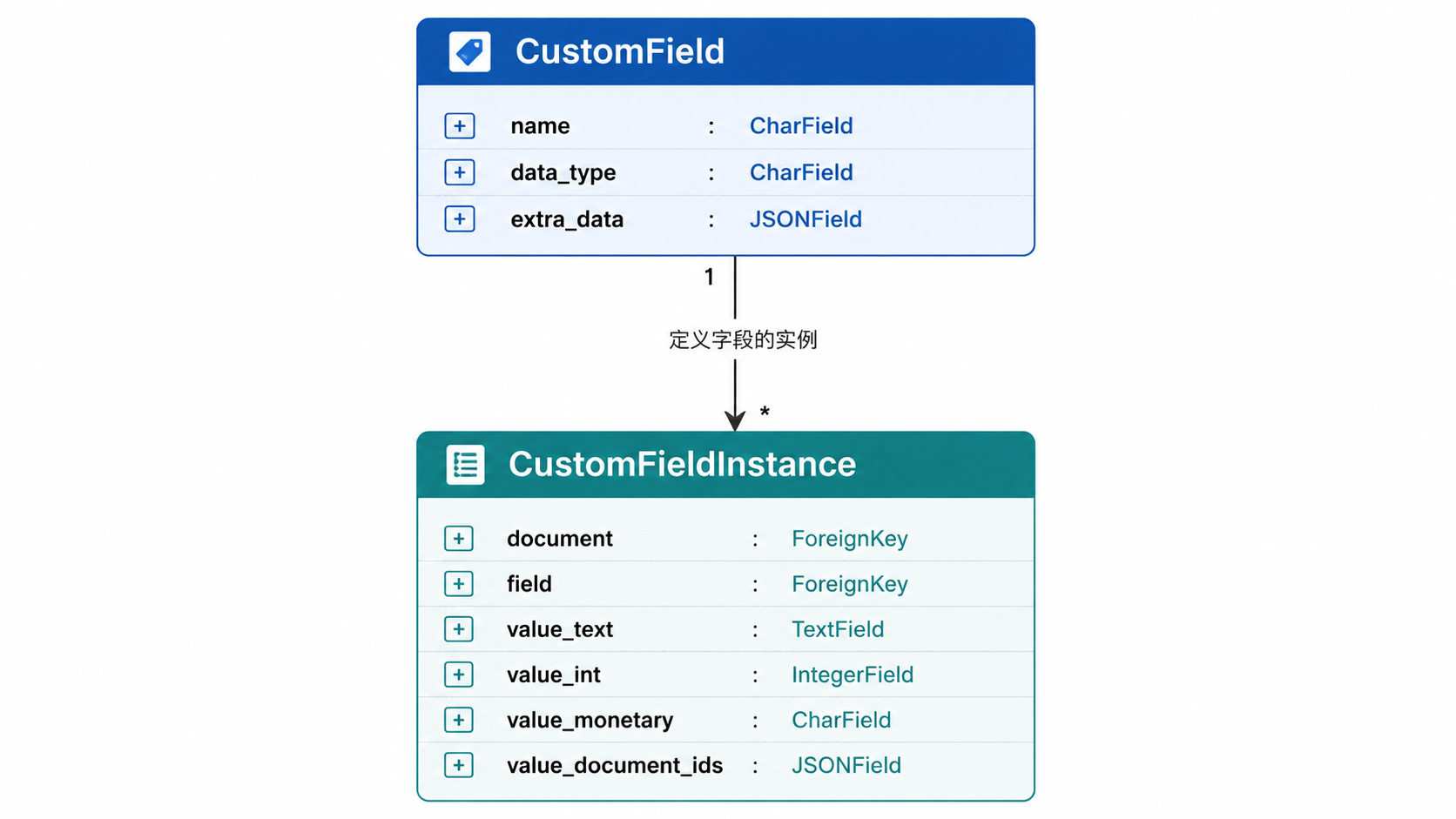
支持的类型包括 STRING、URL、DATE、BOOLEAN、INTEGER、FLOAT、MONETARY、DOCUMENTLINK 和 SELECT src/documents/models.py:722-754。CustomFieldInstance 使用专门的数值字段(例如 value_int)来确保正确的数据库类型和排序 src/documents/models.py:756-830。
来源:src/documents/models.py:722-850, src/documents/admin.py:214-230
工作流与任务
工作流基于触发器自动执行元数据分配和操作。
- WorkflowTrigger:定义工作流何时运行(例如
CONSUMPTION、DOCUMENT_ADDED、SCHEDULED)src/documents/models.py:512-545。 - WorkflowAction:定义执行什么操作(例如
ASSIGNMENT、REMOVE、EMAIL、WEBHOOK)src/documents/models.py:548-590。 - PaperlessTask:追踪后台作业(消费、维护)的状态,包含
duration_seconds和result_data字段src/documents/models.py:853-906。
来源:src/documents/models.py:512-590, src/documents/models.py:853-906, src/documents/signals/handlers.py:50-66
文件处理与命名
系统会根据文档元数据或 StoragePath 模板动态生成文件名。
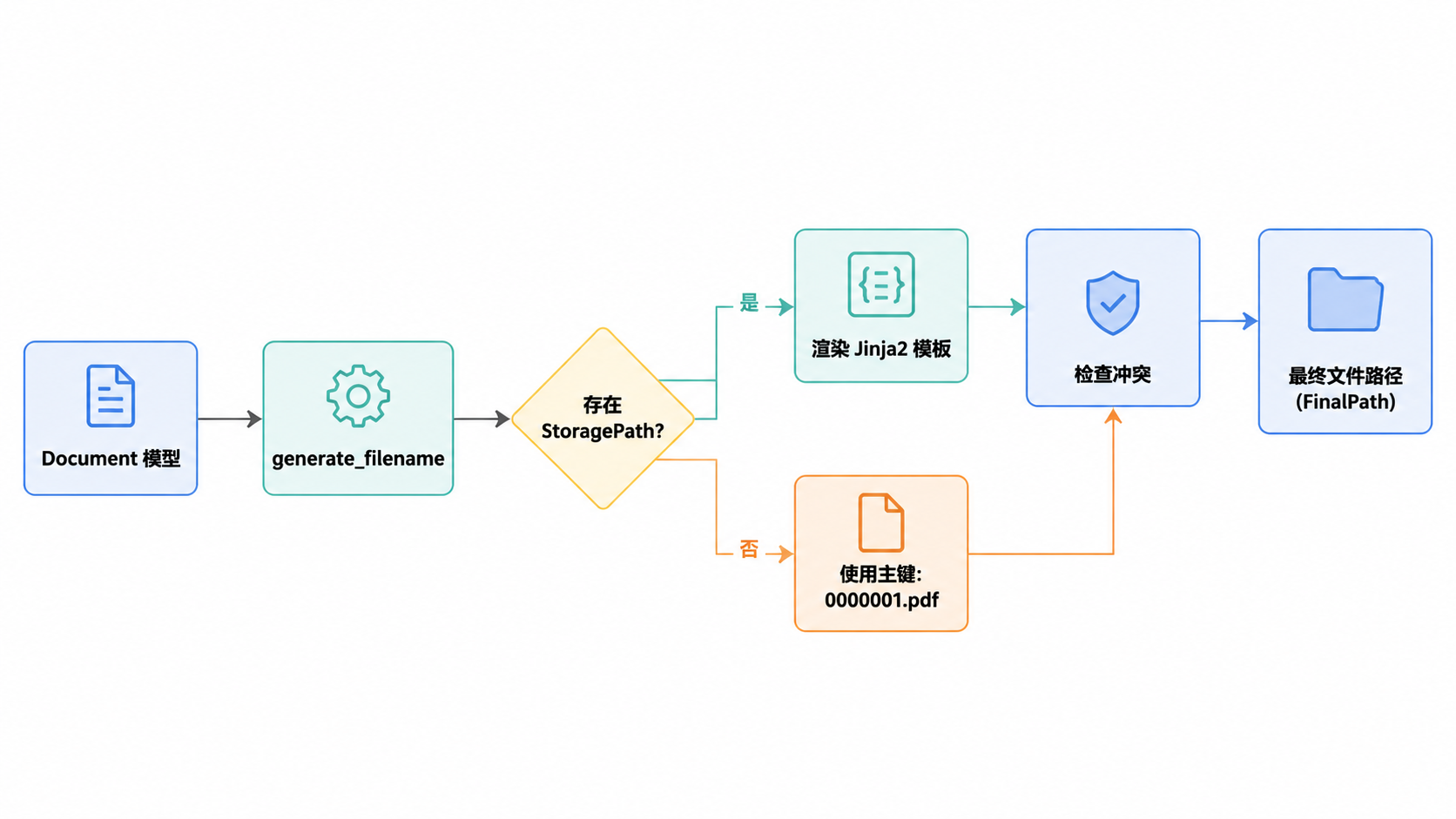
generate_filename:计算ORIGINALS_DIR内的相对路径src/documents/file_handling.py:125-185。generate_unique_filename:如果发生文件冲突,则追加后缀(例如_01)src/documents/file_handling.py:44-100。create_source_path_directory:在保存前确保文件夹结构存在src/documents/file_handling.py:11-13。
来源:src/documents/file_handling.py:11-185, src/documents/tests/test_file_handling.py:33-132
邮件集成模型
邮件处理使用 MailAccount 和 MailRule 从 IMAP 服务器摄取文档。
- MailAccount:存储连接详情和凭证。
- MailRule:为接收的邮件定义过滤器(主题、发件人)和操作(分配标签、通信方)
src/documents/tests/test_consumer.py:37-38。
来源:src/documents/tests/test_consumer.py:37-38